Interests

Lately my blog posts have all been about KDE, a Free software project that I’m interested in. However, since this is also a personal blog, I’ve decided to write a bit more about myself. Therefore I’ve added a category called Interests, where I’ll write about my hobbies and interests.

I’ve always had a lot of hobbies. When I was a child, I usually had one or two activities every weekday (except on Sundays). Many were dropped due to lack of time, but I’ve also picked up a few new interests. I think I’m pretty open to new things, as long as they look fun or seem useful.

Regardless of how much I enjoy a hobby, it’ll only be just that – a hobby. I don’t plan to take either to a professional level.

Still, I want to work with something I’m interested in. The scientific world seems to be perfect – a place with constant new challenges, a place where you’re relatively independent and learn new things every day. Of course it won’t be perfect all the time. specially not in the beginning I would guess. But it’s hopefully interesting enough to give me something to blog about besides the usual KDE-related stuff. 😉

Mouse shortcuts with xbindkeys

Note: This isn’t directly related to KDE. However, since there isn’t such a tool for KDE at the moment, I figured some KDE users might find it interesting as well.

I recently bought a new mouse for my desktop computer, more specifically a Logitech Corded Mouse M500. Up until then I had been using an old mouse with two buttons and a scroll wheel. Now I suddenly have two extra mouse buttons, and a scroll wheel that you can tilt to the left and right. Let’s see how to take advantage of this.

Read the rest of this entry »

KDE Community Forums and Feeds

Good news ahead for all the people who don’t like forums in general, but still want to know what’s going on.

TheFeeds Feed option has been available for a while and makes it possible to create personalized newsfeeds to follow specific forums and subforums. That’s nice, but sometimes it’s not enough.

If you follow Planet KDE you might have heard about the recent improvements on forum.kde.org, including the better search system. It’s faster, it allows you to search for common words (such as ‘kde’) and it offers more options to give more accurate results. However, that’s not all. Now it’s also possible to display the results as a newsfeed, which means that you can make highly customized feeds with posts that you’re interested in.

Below I’ll show you have to make such a feed with an example. If you want to play around with it yourself,  head toSearch Search.

Update October 10, 2009: Feed has been removed. You can use Search to archive the same thing.

Read the rest of this entry »

Spin that spinbox

What is this?

Do you remember this guy? In my previous blog post I asked the KDE community what you thought it was, and after many good guesses Kmetamorphosis finally nailed the answer: it’s for voting on questions in KDialogue.

Another person commented that “if it looks like a spinbox, it acts like a spinbox then probably it’s a spinbox. Only it doesn’t apear to be spinning”. Right, I guess we can call it a spinbox. If you’re the type who likes to spin spinboxes, I have good news for you – the first KDialogue opened recently, which means that you can spin to your heart’s content¹ over in the KDialogue forum!

Don’t forget to take the opportunity to ask Jonathan Riddell one question or four – the more spinboxes, the better right? As someone said, there are no stupid questions (as long as they follow the rules) – only good ones and less good ones. And that decision is in your hands. 😉

KDialogueTake me to the first KDialogue now »


¹ You can only vote on each question once, though.


What is this?

Let’s see if you’ve done your homework lately – can you guess what this is?

What is this?

Hint: it has something to do with the KDE Community Forums.

(If you’re a regular visitor to the forum channel, #kde-forum on freenode, you’re not allowed to answer. ;))

The Road to KDE Devland – step 4

logo

The end of summer

Whew, long time no see! After the summer vacation I’ve had my hands full, so I never found the motivation to sit down and write this. Sorry about the delay.

This step marks the end of summer and will show you what I’ve achieved in these two months. But first something about Qt.

Read the rest of this entry »

Record screencasts to animated GIF files

Since a few people have asked me how I recorded the Plasma HowTo screencasts, I decided to post a short HowTo here. And is there any better way to show this than with an animated GIF? I can almost hear you saying “of course not!”, so here we are:

A typical record session

I use byzanz to record my desktop. It works as a GNOME panel applet but can also be used from the command line.

Now back to the screencast above. I usually do the following steps:

Read the rest of this entry »

Plasma/FAQ/HowTo – No longer experimental

You might have seen my previous posts about Plasma HowTos in form of short screencasts. I’m happy to announce that all screencasts are recorded now and uploaded to UserBase. The full article can be found under Plasma/FAQ/HowTo.

If you don’t know what this is all about, here’s a small taste:

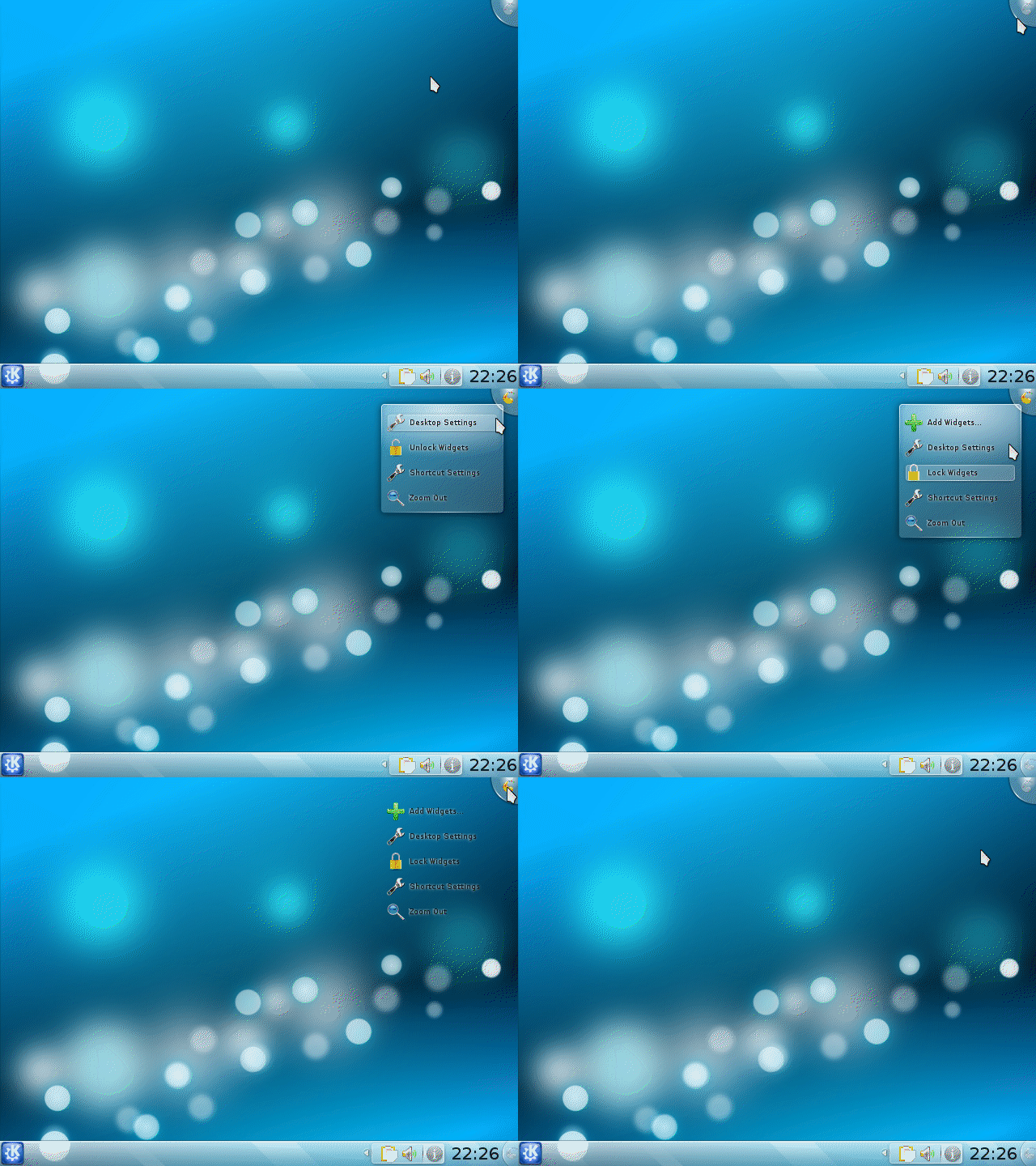
How to unlock your widgets

Obviously you can watch the HowTos to learn more about Plasma, but that’s not all: they can also be used to easily answer beginners’ questions in an easy-to-understand and nice-looking way. In forums, for example, you can use the same thumbnail as the one above to link to a HowTo.

Now, let’s spread the screencasts and make Plasma more comprehensible to new users!

The experiment continues: Plasma/HOWTO

Due to the positive feedback I received in my last post, I decided to take the experiment one step further. A page that listed all Plasma HOWTO screencasts – doesn’t that sound good?

My initial idea was to do it on my blog and eventually move it to UserBase if it was well received by the community. However, some people on IRC already voiced interest for such an article on the wiki, so here it is:

Plasma/HOWTO

Currently it’s on my own page, but the plan is to move it to Plasma/HOWTO when more screencasts have been done. As you can see, I’ve only done the first section (Widgets).

Dear KDE community, now I need your help. Are the sections strange? Do you miss a HOWTO? Should something be rearranged? Please help to improve the article! It’s a wiki, so feel free to edit it. However, if it’s something major, I would appreciate if you wrote a note under Discussion first.

Thanks everyone who commented my last post, you motivated me to continue this experiment.

Experiment: Short Plasma HOWTO screencasts

Being an active member in the KDE Community Forums, I regularly see users asking how to do this and that in Plasma. My usual answer is something like “Click on cashewCashew -> [Unlock Widgets] -> Add Widgets… -> drag widgets from the “Add Widgets” dialog to desktop/panel”. Sometimes I also refer to the Plasma FAQ.

This works, but I’ve been thinking about a more… amusing way to give the answer (in lack for a better word). Inspired by the Plasma screencasts on blip.tv, I decided to make a few screencasts. In contrast to those on blip.tv, mine are very short, direct and without any text – they’re meant to simply answer one question.

Read the rest of this entry »