
Skim and scan

Three days have gone since I wrote the first post about Zetta, a new start menu for KDE4. I admit I expected more comments, especially since many complain about Kickoff; the huge amount of text probably scared away many potential readers. However, the few responses I received in the KDE forum was really helpful.

Today I’ll be talking about the two modes in the application view: skim mode and scan mode. I choose these names to give you an idea of what they’re for, but in Zetta they’ll most likely be addressed as icon view respective list view.
Read the rest of this entry »

Zetta – A new start menu

The Problem

Currently, KDE4 has three start menus: Kickoff, Traditional Menu and Lancelot. Then there’s Raptor, the menu everyone is waiting for.

With this many alternatives, is there really a need for another start menu? Since I’m writing this post, my answer would obviously be ‘Yes’. Among the three menus I’ve tried, the traditional KMenu is still my favorite. Granted, it’s the one I’m most used to, but the others bug me for one common reason: browsing among the applications is a pain.

Kickoff requires many clicks if you just want to see which applications you have installed on your system, something that many persons I’ve talked to dislike. While Lancelot’s solution is very interesting, it still doesn’t hit the sweet spot for me. And the Traditional Menu simply lacks some nice features the new menus have.

Read the rest of this entry »

Posted in KDE. 1 Comment »

Where have all the screensavers gone?

Long time passing

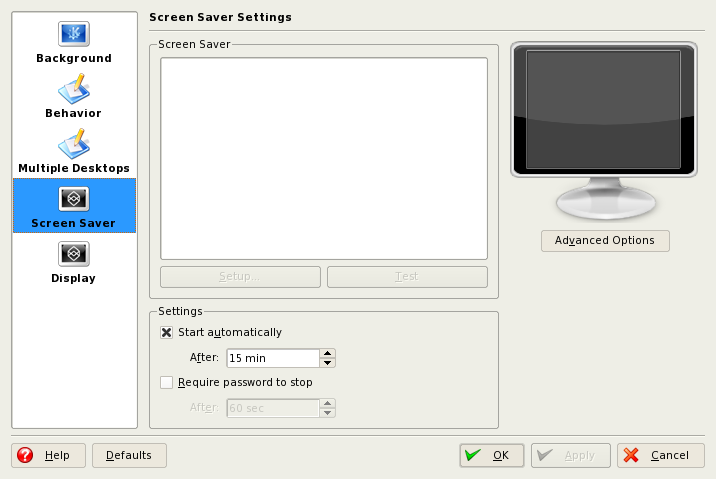
So, I’ve had this problem a long time and never bothered fixing it. It’s about screensavers in KDE. More specifically, the non existing screensavers – when I try to configure them, all I get is an empty list.

Screensavers

Apparently, this problem was user specific. By creating a new user, I could confirm that the screensavers still were there. So, it has to be a config file I thought, and started digging in ~/.kde.

The ~/.kde/share/config/kdesktoprc looked suspicious, so I deleted it. Or rather, I renamed it to kdesktoprc2 to let KDE recreate the file. But still no screensavers.

Then I stumbled upon this bug report. I tried to delete (once again, I renamed it to keep the original one as a backup) ~/.local/share/desktop-directories and ~/.config/menus. Warning! This will reset KMenu to its default settings.

After logging out and in again, I found that my screensavers were back (not sure if you have to log out though). Neat. Now I’m going to change my screensaver from the analog clock to something more flashy.

“A New, More Powerful, Desktop” for Mac OS X

Conjure is a new an application for Mac OS X which replaces the traditional desktop. According to their website, it let’s you deal with things in a “completely unstructured, visual, and organic way.” Some of the features mentioned are the ability to type text or draw lines directly on the desktop, record audio files and an instant overview mode of something that seems to be similar to virtual desktops.

As a picture says more than thousand words, here you go:

Conjure

Anyone else who gets Plasma/Basket vibes?
If you think it sounds interesting, a video will be available on their homepage soon (tomorrow, it says).

Oh, did I mention that it costs USD 34.99?

Posted in KDE, Random. 2 Comments »